
How to Use Tags
Tagging Posts
What are tags?
Tags make it easier for readers to find posts about a specific topic on your blog. e.g. Tag your photographs with photography or your trip posts with travel.
How do I tag my posts?
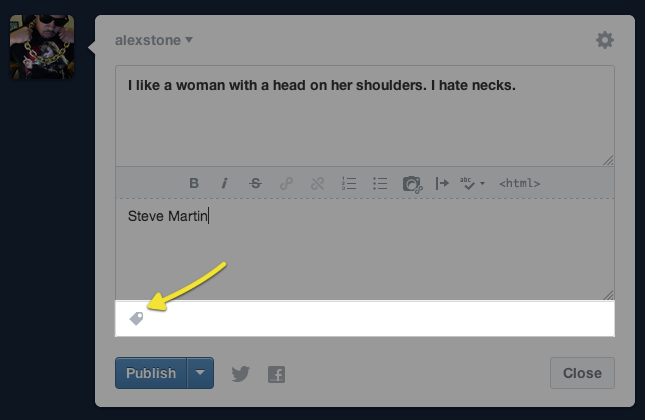
It’s easy! When you create a post, enter the tags in the last field of the form. If you’re using the bookmarklet, go to “Advanced” to enter tags.
Tips:
- You don't need to put a tag in quotes or start with a hashtag.
- Hit enter after each tag, or a comma if you're using the bookmarklet.
Will the tags I use display on my blog?
Yes, but only if you’re using certain themes. You can find themes that list tags with each post in the Theme Garden. Even if a theme doesn’t show post tags, your tags can still be searched across Tumblr.
How do tags work on password-protected blogs?
You can add tags to keep your posts organized, but they will only be searchable through your blog, not the rest of Tumblr.
Searching Tags
How do I search tags?
- Enter the tag in the "Search Tags" box at the top of your Dashboard.
- Hit enter.
Can I search for multiple tags at once?
No, that’s not supported.
Tracked Tags
What are tracked tags?
Tracked tags are a great way to follow your passions on Tumblr! You can access your tracked tags by clicking the “Search tags” box at the top of your Dashboard. New posts will be reflected in the number below the tag name. This number will not appear if you’re tracking more than 20 tags.
Pro-tip: Hit the tab key and your tracked tags will pop open in a menu on your Dashboard.
How do I track a tag?
- Enter the tag in the “Search tags” box at the top of your Dashboard.
- Hit enter.
- Click “track” in the search box.
How do I stop tracking a tag?
- Click the “Search tags” box at the top of your Dashboard.
- Click the name of the tag.
- Roll over “tracking” and click “untrack.”
Linking to Tags
Can I link to specific tags?
Sure! To direct users to all posts with a specific tag, just use tag links that start with your blog’s web address and include the specific tags you want to reference.
Examples:
http://staff.tumblr.com/tagged/features
http://staff.tumblr.com/tagged/events
These tag filter links will only show the 200 most recent posts with that tag in reverse chronological (latest posts on top).
To display posts in chronological order (older posts on top), add /chrono to the end of the tag URL (i.e. http://staff.tumblr.com/tagged/features/chrono).
Can I create a Page that redirects to my posts with a specific tag?
You bet! Learn how to do that here.

